Diomara Keynote Template: A Practical Review for Modern Presenters
In the fast-paced world of business communication and creative storytelling, the visual quality of a presentation can often determine how effectively a message is received. While content remains king, the vessel that delivers it must be intuitive, professional, and aesthetically pleasing. This is where specialized design assets like Diomara - Keynote Template enter the workflow. Designed for Apple’s Keynote application, this template aims to bridge the gap between high-end graphic design and everyday usability, offering a robust solution for professionals who need to produce polished slides without starting from scratch.
For entrepreneurs, marketers, educators, and freelancers, time is a finite resource. Spending hours aligning text boxes or selecting color palettes is rarely an efficient use of energy. Diomara positions itself as a comprehensive toolkit that streamlines this process. By providing a fully editable framework with pre-designed elements, it allows users to focus on their narrative rather than the mechanics of slide construction. This article explores the features, usability, and practical value of the Diomara template to help you decide if it fits your specific presentation needs.
Core Features and Design Flexibility
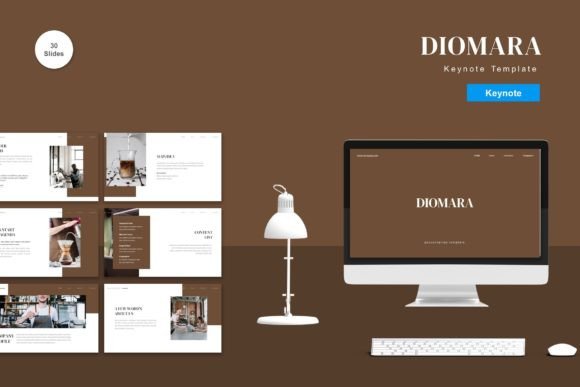
The foundation of any good template is its versatility. Diomara offers a substantial library of 150 total slides, which is significantly more than many standard templates provide. These are not merely repetitive layouts; the collection includes 30 distinct, useful slide types designed to handle various content formats. Whether you need to display complex data charts, introduce team members, showcase a product roadmap, or present a simple quote, there is likely a pre-built layout that accommodates your requirement.
One of the standout characteristics of Diomara is its approach to color. The template comes with 5 premade colors, allowing users to switch the entire aesthetic of the presentation with minimal effort. This is particularly valuable for agencies or consultants who work with multiple clients and need to adhere to different brand guidelines. Instead of manually recoloring every element, the master slide functionality enables a global change, ensuring consistency across all 150 slides. Furthermore, because the design is vector-based, graphics remain crisp and clear regardless of scaling, which is essential for high-resolution displays and projectors.
The template also emphasizes ease of editing. All elements are fully customizable, meaning you can input your content, replace placeholder images, and adjust shapes to suit your preference. The use of recommended free web fonts ensures that the typography remains accessible and consistent, avoiding the common issue of missing fonts when sharing files between different systems.
Usability and Workflow Integration
A beautiful template is useless if it is difficult to navigate. Diomara is built on a drag-and-drop philosophy, which lowers the barrier to entry for users who may not have advanced design skills. The structure relies heavily on Master Slides, a feature in Keynote that controls the overall look and feel of the presentation. By understanding how to utilize these masters, users can make broad changes efficiently. For instance, changing a logo position or adjusting the footer style can be done once in the master view, automatically updating every subsequent slide.
The inclusion of animated slides adds a layer of dynamism to presentations. Motion, when used sparingly and purposefully, can help guide the audience’s attention and maintain engagement. Diomara includes these animations by default, but because every element is editable, users have the freedom to tone them down or remove them entirely if a more static approach is preferred. This flexibility is crucial for maintaining professionalism in conservative corporate environments while still offering flair for creative pitches.
It is important to note that the package includes five separate Keynote files, each corresponding to one of the premade color schemes. This organization helps prevent file bloat and makes it easier to start a new project with the desired color palette already active. Additionally, a "Readme First" file is included, which serves as a critical resource for understanding the template’s structure and troubleshooting common issues.
Who Benefits Most from Diomara?
While Diomara is marketed for all business and personal needs, certain groups will find it particularly advantageous. Freelancers and consultants often juggle multiple projects with tight deadlines. Having a reliable, go-to template that looks premium out of the box can save hours of design time per project. Similarly, small business owners who may not have a dedicated marketing team can use Diomara to create investor decks, sales presentations, or internal reports that convey credibility and attention to detail.
Educators and trainers will appreciate the variety of layout options. The ability to switch between text-heavy slides, image-focused layouts, and data visualization charts allows for a more engaging learning experience. The clean design ensures that the educational content remains the focal point, rather than being distracted by overly ornate graphics.
However, it is worth considering the limitations. The template is exclusive to Keynote, which means users committed to Microsoft PowerPoint or Google Slides will need to convert files, a process that can sometimes disrupt formatting. Therefore, this tool is best suited for those already embedded in the Apple ecosystem or those willing to adapt their workflow to Mac-based presentation software.
Quality, Consistency, and Long-Term Value
From a quality perspective, Diomara demonstrates a strong understanding of modern design principles. The use of whitespace, balanced typography, and vector graphics contributes to a clean and professional appearance. Consistency is perhaps the most significant benefit of using a structured template like this. When every slide follows the same grid system and font hierarchy, the presentation feels cohesive and well-thought-out. This consistency builds trust with the audience, as it signals preparation and professionalism.
In terms of long-term value, the investment in Diomara pays off through reusability. Once you familiarize yourself with the master slides and editing processes, you can rapidly deploy new presentations. The 150-slide library ensures that you are unlikely to run out of fresh layouts for quite some time. Moreover, the editable nature of the template means it can evolve with your brand. As your company’s visual identity changes, you can update the master colors and fonts, extending the life of the template indefinitely.
It is also prudent to mention that preview images are not included in the final download, which is standard practice for digital template sales to protect intellectual property. Users should rely on the provided previews on the sales page to gauge the visual style before purchasing.
Final Thoughts on Diomara
Diomara - Keynote Template represents a solid choice for anyone looking to elevate their presentation game without hiring a professional designer. Its strength lies in the balance between aesthetic appeal and functional simplicity. The combination of 150 slides, five color variations, and full editability provides a flexible canvas for a wide range of topics. While it requires familiarity with Keynote’s master slide features to unlock its full potential, the learning curve is manageable for most users.
For those who prioritize efficiency, consistency, and visual polish, Diomara offers a practical solution. It removes the friction of design decisions, allowing you to concentrate on what truly matters: delivering your message with clarity and impact. If you are ready to streamline your presentation workflow, you can Get it now Diomara - Keynote Template for All Business and Personal Needs and start creating compelling visuals today.